Navigating the intricate world of internet speeds for optimal gaming can feel like a boss battle in itself especially for busy adults juggling work family and personal passions. This comprehensive guide cuts through the technical jargon to answer the burning question how much mbps is good for gaming providing clear actionable insights. We understand that your gaming time is precious a well-deserved break or a chance to connect with friends across digital realms. Slow internet can turn epic victories into frustrating lags or disconnects impacting that vital relaxation and social connection. This article empowers you with the knowledge to optimize your setup balancing performance with budget-friendly choices ensuring your online adventures are smooth responsive and truly enjoyable. Learn the essential speeds for different game types understand the hidden culprits behind poor performance and discover practical steps to future-proof your gaming connection. Its time to banish lag and embrace seamless play with a connection that truly supports your passion for gaming. Dont let slow speeds hold you back from epic wins and memorable moments with friends online.
What is the minimum Mbps for casual online gaming?
For casual online gaming such as social multiplayer games or non-competitive titles a download speed of around 25 to 50 Mbps is generally sufficient. This allows for smooth gameplay without significant lag provided youre the only heavy user on the network. Upload speeds of at least 3-5 Mbps are also recommended for stable connectivity and basic in-game communication.
Why is low ping more important than high Mbps for competitive gaming?
Ping also known as latency measures how quickly your computer sends and receives data from the game server. For competitive gaming like esports titles a low ping 20ms or less is crucial because it dictates how fast your actions register in the game. Even with a blazing fast 500 Mbps connection high ping will result in noticeable delays making a huge difference in fast-paced scenarios where split-second decisions matter.
How does a household with multiple gamers impact required internet speed?
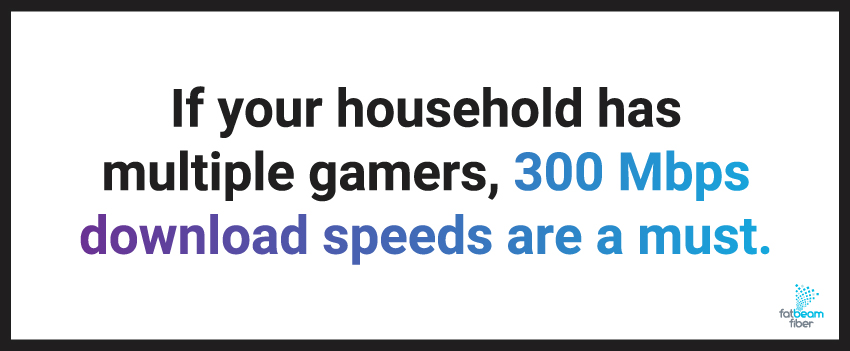
In a household with several gamers or heavy internet users the required Mbps jumps significantly. Each simultaneous online gaming session streaming high-definition video or large file downloads consumes bandwidth. For families with 2-3 active gamers or streamers a connection of 100-300 Mbps or even higher is advisable to ensure everyone enjoys a smooth uninterrupted experience without battling for bandwidth.
What upload speed is good for streaming gameplay to platforms like Twitch or YouTube?
If youre planning to stream your gameplay to platforms like Twitch YouTube or Discord a robust upload speed is essential. For 720p at 30fps you typically need 3-6 Mbps upload. For 1080p at 60fps which is a common standard for engaging streams you should aim for 8-15 Mbps upload or more to ensure a clear consistent stream quality for your viewers.
Can Wi-Fi affect my gaming performance even with high Mbps?
Yes Wi-Fi can absolutely impact gaming performance even if your internet plan has high Mbps. Wireless connections introduce inherent latency and are susceptible to interference from other devices physical obstructions and network congestion. Using an Ethernet cable provides a more stable lower-latency connection which is critical for competitive or sensitive online games where every millisecond counts in responsiveness.
What are common culprits for lag besides low Mbps?
Besides insufficient Mbps several factors can cause lag. High ping due to distance from game servers or poor routing is a major one. Network congestion from too many devices using bandwidth outdated router firmware or a weak Wi-Fi signal can also degrade performance. Even your gaming device itself an old PC or console with limited RAM or a struggling CPU can introduce input lag regardless of your internet speed.
Is 1 Gigabit internet overkill for gaming?
For most individual gamers 1 Gigabit 1000 Mbps internet is indeed overkill purely for playing games. Competitive gaming rarely uses more than 50-100 Mbps download and much less upload. However 1 Gig is excellent for large households with multiple 4K streamers frequent huge game downloads or extensive cloud backups ensuring everyone has ample bandwidth without compromise.
Ever found yourself staring at a frozen screen during a crucial boss fight or watching your character rubber-band across the map while your friends sail by seamlessly? Youre not alone. In 2026 with 87 percent of US gamers regularly logging in for an average of over 10 hours a week nothing kills the fun faster than a laggy internet connection. Whether youre a parent squeezing in a quick session after the kids are asleep or a professional unwinding with your guild after a long day your gaming time is precious. The big question we all grapple with is how much mbps is good for gaming? Is it just about a big number from your internet provider or are there hidden factors at play? This isnt just about raw speed its about a stable responsive experience that lets you relax build skills connect with friends and truly escape into your favorite digital worlds. This comprehensive guide will cut through the hype providing you with clear actionable answers and practical tips to optimize your setup ensuring your gaming sessions are smooth enjoyable and free from frustrating interruptions. Lets make sure your internet connection supports your passion not hinders it.
How Much Mbps Is Really Good for Gaming in 2026?
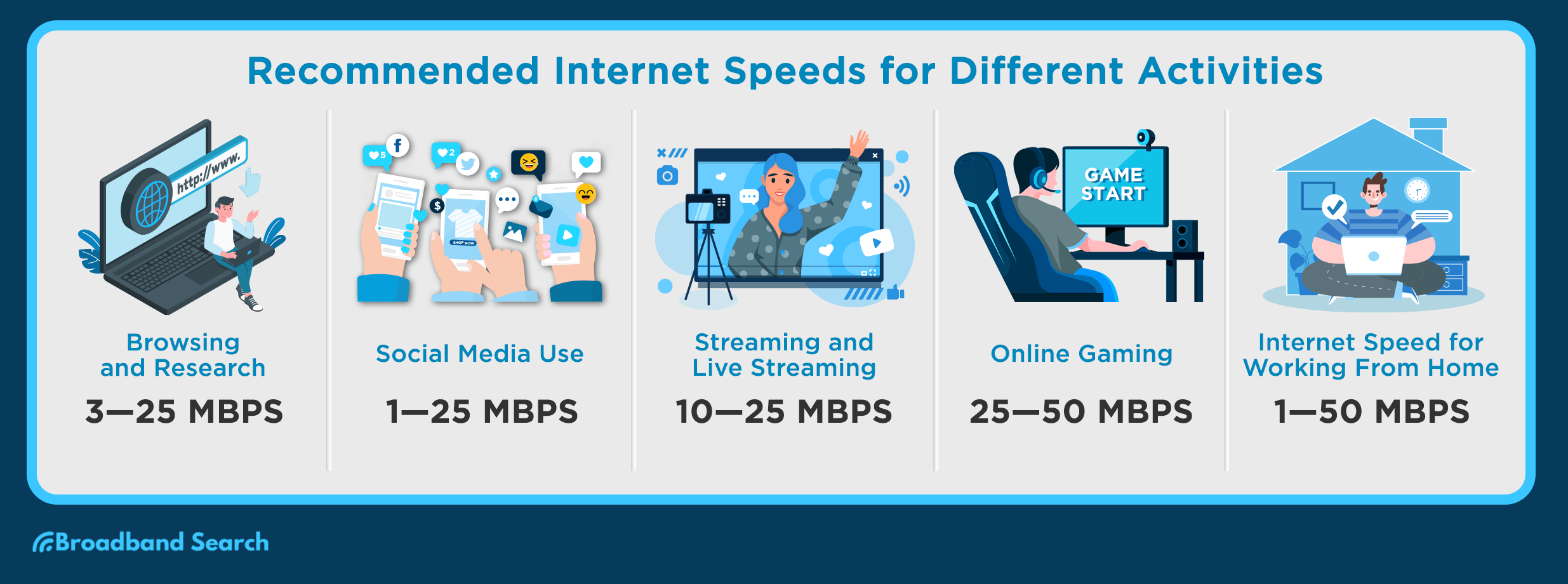
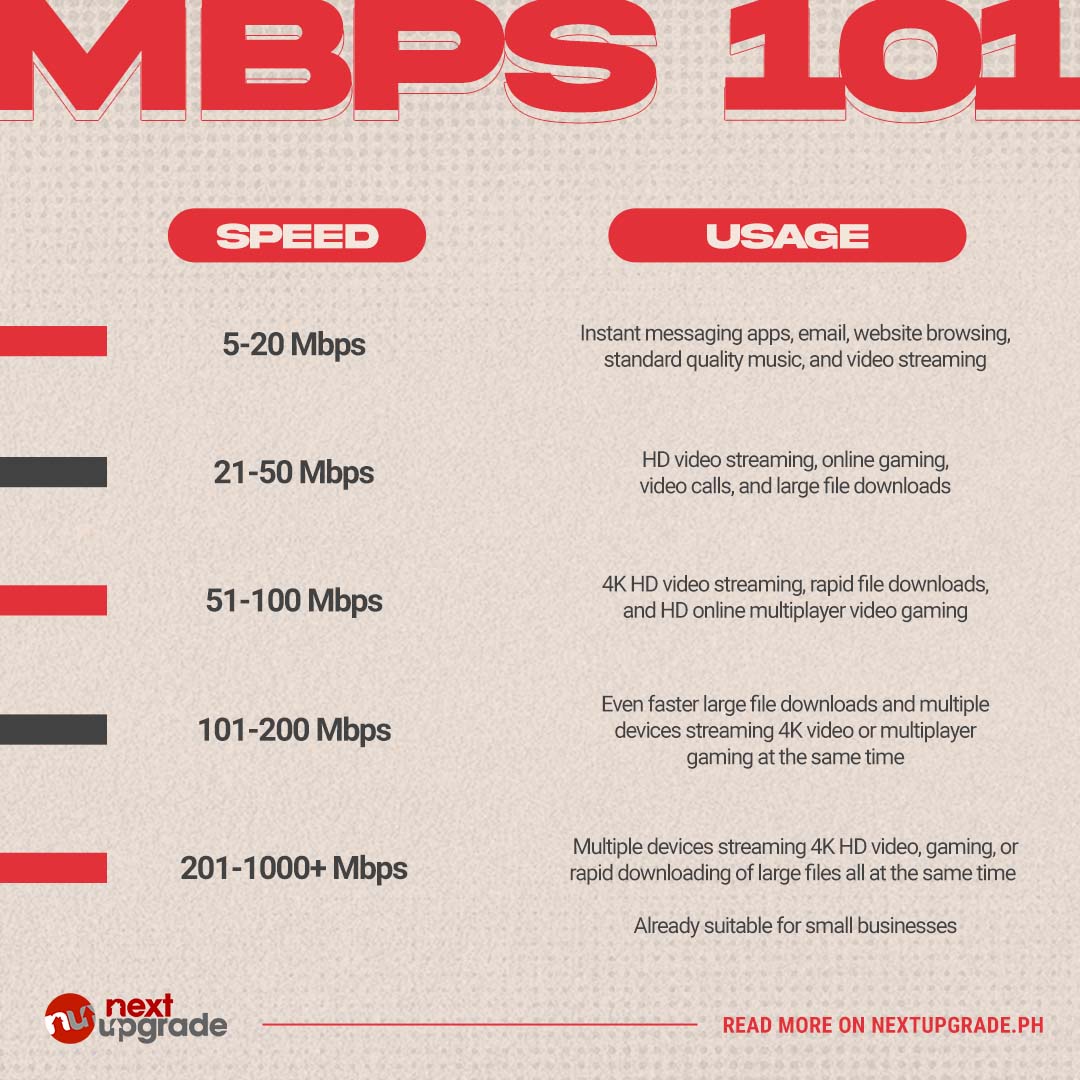
When asking how much mbps is good for gaming the answer isnt a one-size-fits-all number. It truly depends on your specific gaming habits and household dynamics. For most solo casual gamers a download speed of 25-50 Mbps (Megabits per second) is generally sufficient. This allows for smooth online play for popular titles like Animal Crossing New Horizons Palworld or even slower-paced competitive games without major hiccups. Youll be able to download smaller updates fairly quickly and enjoy your games without constant frustration.
However if youre a serious competitive gamer or live in a household with multiple heavy internet users you’ll want to aim much higher. Think 100-300 Mbps or even more. This bandwidth provides the headroom necessary for simultaneous online gaming 4K streaming large game downloads that can sometimes be hundreds of gigabytes and general web browsing without impacting your game. Considering the average US gamer spends over 10 hours a week gaming and often balances this with work and family a robust connection ensures your precious free time is spent playing not waiting or troubleshooting.
Beyond Mbps Why Is Latency Ping So Critical for Gamers?
While a high Mbps number looks great on paper its not the only or even the most important factor for a stellar gaming experience especially in competitive titles. Latency commonly known as ping measures the time it takes for a data packet to travel from your gaming device to the game server and back. Its measured in milliseconds ms. For gamers particularly those engaging in fast-paced shooters or fighting games a low ping is absolutely crucial.
Imagine this: you see an enemy in a shooter and press the fire button. If your ping is 10ms that action registers almost instantly. If your ping is 100ms there's a noticeable delay of a tenth of a second which can mean the difference between a headshot and getting eliminated. Even with a blazing fast 1000 Mbps internet plan high ping will still make your game feel unresponsive and laggy. Aim for a ping under 50ms with <20ms being ideal for competitive play. This low latency ensures your actions are registered server-side with minimal delay providing a fair and responsive gameplay experience.
What Are the Recommended Speeds for Different Types of Games?
Different genres of games have varying demands on your internet connection. Understanding these can help you choose the right speed and avoid overspending or underperforming. Heres a quick breakdown:
- Casual Online Games (e.g. Animal Crossing Minecraft Roblox): These games are relatively forgiving. 10-25 Mbps download and 1-3 Mbps upload per player should be enough. The focus is more on stable connection than ultra-low latency.
- MMOs & RPGs (e.g. World of Warcraft Final Fantasy XIV Genshin Impact): These require a stable connection for continuous data flow but are less sensitive to micro-latency spikes than shooters. 25-50 Mbps download and 3-5 Mbps upload are good. Socializing on Discord while playing is common so that upload helps.
- Battle Royales & Online Shooters (e.g. Call of Duty Warzone Fortnite Apex Legends Valorant): This is where low ping is king. While 50-100 Mbps download is great for updates and ensuring no bandwidth bottlenecks 5-10 Mbps upload and consistent latency under 20-30ms are far more critical for responsiveness.
- Cloud Gaming (e.g. Xbox Cloud Gaming GeForce Now PlayStation Plus Premium): These services stream the game to you like a video. They are very bandwidth-intensive. You'll need at least 50-100 Mbps for smooth 1080p streaming and 200+ Mbps for 4K. Stability is also paramount to prevent visual artifacts and input lag.
- Streaming Your Gameplay (e.g. Twitch YouTube): If you're broadcasting your adventures you need robust upload speeds. For 720p 30fps aim for 5-8 Mbps upload. For 1080p 60fps which is a popular standard for engaging streams you'll want 8-15 Mbps upload or more to ensure a crystal-clear stream for your audience.
How Does Your Household Size and Activity Affect Your Gaming Internet Needs?
Your personal gaming habits are just one piece of the puzzle. The number of people in your household and their internet usage patterns significantly impact how much bandwidth you truly need. Imagine you're trying to land a crucial skill shot in a competitive match while your partner is streaming 4K Netflix in the living room and your kids are downloading a massive new game update on their console. Suddenly that 100 Mbps connection might feel like 20 Mbps.
For a single gamer living alone 50-100 Mbps is often ample. Add another person who streams video calls or browses heavily and you might want to bump that to 100-200 Mbps. In a larger family home with multiple simultaneous users—perhaps two gamers 4K streaming on two TVs and several mobile devices active—a 300-500 Mbps plan or even a gigabit connection (1000 Mbps) becomes far more reasonable to avoid arguments over internet performance. Many US households today are a hub of digital activity from remote work to online learning and social media meaning shared bandwidth needs careful consideration to keep everyone happy and connected.
Wired vs. Wireless Why Ethernet Still Reigns Supreme for Gaming?
In a world of ubiquitous Wi-Fi many gamers wonder if a wired connection is still necessary. The short answer is yes especially for any serious or competitive gaming. While modern Wi-Fi standards like Wi-Fi 6 and Wi-Fi 6E offer impressive speeds they still introduce inherent disadvantages compared to a direct Ethernet cable connection.
Ethernet cables provide a stable low-latency connection. They are less susceptible to interference from other wireless devices microwaves baby monitors or even physical obstructions like walls. This stability translates directly to a lower more consistent ping and fewer frustrating disconnections or packet loss issues during intense gaming moments. For that reason even if you have a blazing fast Wi-Fi connection with high Mbps always prioritize an Ethernet connection for your primary gaming PC or console when possible. It's one of the simplest and most effective upgrades you can make to your gaming setup without spending a fortune on hardware.
Are You Getting What You Pay For How to Test Your Gaming Internet Speed?
Its one thing to pay for a certain internet speed but another to actually receive it. Regularly testing your internet speed is crucial for diagnosing issues and ensuring youre getting the performance your ISP promises. Several free online tools can help you do this effectively.
The most popular options include Speedtest.net Google's own speed test by searching 'speed test' and Fast.com from Netflix. When running a test pay attention to three key metrics: download speed upload speed and ping ms. For the most accurate results:
- Connect your gaming device directly to your router with an Ethernet cable.
- Close all other bandwidth-heavy applications and devices on your network.
- Run tests multiple times at different times of the day including peak gaming hours.
- Test against different servers to get a broader picture of your latency to various locations.
If your results are consistently lower than what youre paying for contact your ISP. They might be able to troubleshoot issues on their end or suggest modem/router replacements. Its your money and your gaming experience so advocate for the performance you deserve.
Troubleshooting Lag Common Culprits Beyond Slow Mbps
So youve got a good Mbps connection and your ping looks decent but youre still experiencing frustrating lag spikes or unresponsiveness. What gives? Many factors beyond raw internet speed can cause gaming performance issues. Heres a rundown of common culprits:
- Outdated Router Firmware: Just like your games your router needs updates. Keep its firmware current for optimal performance and security.
- Network Congestion: Too many devices on your home network trying to use bandwidth at once can create bottlenecks. Identify and pause non-essential downloads or streams.
- Poor Wi-Fi Signal: If youre forced to use Wi-Fi a weak signal due to distance or obstructions will cause lag. Consider a Wi-Fi extender a mesh system or moving your router.
- ISP Throttling: Some internet service providers might intentionally slow down certain types of traffic during peak hours. A VPN can sometimes bypass this but adds its own latency.
- Game Server Issues: Sometimes the problem isn't on your end but with the game servers themselves. Check game status pages or community forums for widespread reports.
- Overloaded Gaming Device: An old PC with limited RAM a struggling CPU or an unoptimized console can cause input lag or stutters regardless of your internet speed. Ensure your gaming rig meets or exceeds game recommendations.
- Router Placement: Your router should be in a central open location away from other electronics that emit interference.
Optimizing Your Network Practical Tips for a Smoother Gaming Experience
Beyond simply increasing your Mbps there are several practical steps you can take to optimize your existing home network for a superior gaming experience. These tips focus on stability and efficiency.
- Use an Ethernet Cable: We cannot stress this enough. A wired connection is king for low latency and reliability.
- Enable Quality of Service (QoS): Many modern routers have QoS settings that allow you to prioritize certain types of traffic or specific devices. Set your gaming PC or console to high priority to ensure it gets preferential bandwidth.
- Update Router Firmware: Check your router manufacturer's website for the latest firmware updates. These often include performance improvements and bug fixes.
- Minimize Background Usage: Close unnecessary browser tabs pause large downloads on other devices and disconnect devices not actively in use during critical gaming sessions.
- Change Wi-Fi Channel: If you're on Wi-Fi use a Wi-Fi analyzer app to find less congested channels in your area and switch your router to one of them. This can reduce interference.
- Restart Your Router Regularly: A quick power cycle can often resolve minor network glitches and refresh your connection.
- Consider a Gaming Router: These routers often come with advanced QoS features faster processors and better antennas specifically designed to optimize gaming traffic.
Budget-Friendly Upgrades Boosting Performance Without Breaking the Bank
You don't always need to shell out hundreds of dollars to improve your gaming internet. There are several cost-effective upgrades and strategies that can make a big difference especially for gamers balancing life and budget.
- A Good Ethernet Cable: A reliable Cat6 Ethernet cable is cheap and one of the best investments you can make.
- Router Placement: Simply moving your existing router to a more central open location can dramatically improve Wi-Fi signal strength and stability.
- Check Your Internet Plan: Contact your ISP. Sometimes newer plans offer better speeds for a similar price or promotional deals can get you a significant upgrade without a huge cost jump.
- Wi-Fi Extender/Mesh System (if Wi-Fi is unavoidable): For larger homes where Ethernet isn't feasible a decent Wi-Fi extender or a budget-friendly mesh Wi-Fi system can improve coverage and reduce dead zones.
- Optimize Your Gaming Device: Ensure your PC is clean of bloatware drivers are updated and background processes are minimized. For consoles ensure theyre well-ventilated and have sufficient storage. These are free or low-cost fixes that impact overall performance.
Future-Proofing Your Connection What to Look for in 2026 and Beyond?
The gaming landscape is constantly evolving and your internet connection needs to keep pace. As of 2026 we're seeing continued trends in cloud gaming high-fidelity VR experiences and increasingly social online worlds that demand more from our networks. To future-proof your gaming setup consider these factors:
- Fiber Optic Internet: If available fiber is the gold standard offering symmetrical high speeds (fast download and upload) and extremely low latency which is ideal for all current and future gaming needs.
- Higher Baseline Speeds: While 50 Mbps might be fine now for solo play with larger game files more frequent updates and growing household bandwidth demands aiming for a baseline of 100-200 Mbps for any new plan is a smart move.
- Wi-Fi 6E Routers: These utilize the less congested 6GHz band providing faster speeds and lower latency for compatible wireless devices. As more devices adopt Wi-Fi 6E it will become increasingly beneficial.
- Reliable Upload Speed: With the rise of user-generated content streaming and social platforms like Discord being integral to the gaming experience a robust upload speed isn't just for streamers anymore.
- Scalability: Choose an ISP and plan that allows for easy upgrades in speed as your needs or household demands grow without requiring a full system overhaul.
FAQ Section
Is 100 Mbps internet good enough for most gaming?
Yes 100 Mbps download speed is more than sufficient for most individual gamers and even small households. It allows for smooth online gameplay fast downloads of new games and updates and can comfortably support streaming in HD or 4K on other devices simultaneously.
Does my upload speed matter for gaming?
Upload speed matters significantly if you plan on streaming your gameplay hosting multiplayer sessions or frequently using voice chat with friends. While less critical for just playing games a decent upload speed ensures your outgoing data is consistent preventing communication lag and stream pixelation.
Can a new router improve my gaming experience?
Absolutely. An older or basic router can be a major bottleneck. Upgrading to a modern Wi-Fi 6 or 6E router with Quality of Service QoS features can prioritize gaming traffic reduce latency and provide more stable connections especially in busy households.
What is packet loss and how does it affect gaming?
Packet loss occurs when data packets sent over the internet fail to reach their destination. In gaming this manifests as stuttering teleporting characters or actions not registering. It's often caused by network congestion faulty cables or problems with your internet service provider's network and seriously degrades gameplay.
Should I use a VPN for gaming?
Generally no. While VPNs can sometimes bypass ISP throttling or protect privacy they typically add extra latency due to the encryption and rerouting of traffic which is detrimental to gaming performance. Only use one if absolutely necessary or if it specifically routes you to a closer game server.
How often should I restart my router for optimal gaming?
Restarting your router regularly perhaps once a week or every few days can help clear its memory resolve minor network glitches and ensure it's performing optimally. This simple step often fixes intermittent connection issues and improves overall network stability for gaming.
So there you have it. Understanding how much mbps is good for gaming involves more than just a single number; its about a holistic view of your internet connection. From prioritizing low latency to choosing the right hardware and optimizing your home network you now have the tools to significantly enhance your online gaming experience. Remember your gaming time is valuable a chance to unwind connect and challenge yourself. Dont let a subpar connection steal that joy. By implementing these tips you can ensure your virtual adventures are smooth responsive and utterly immersive.
What's your biggest gaming challenge when it comes to internet performance? Comment below and let's conquer it together!
Optimal gaming Mbps depends on game type and number of users. Low latency ping is more critical than raw speed for competitive play. Minimum 25-50 Mbps for solo online gaming 100+ Mbps for households with multiple gamers or streamers. Ethernet connection is superior to Wi-Fi for stability. Optimize router settings and reduce background bandwidth usage. Regular speed tests help monitor performance. Understand upload speed importance for streaming and hosting. Upgrade hardware wisely to avoid bottlenecks. Balance internet costs with actual gaming needs. Consistent connection quality outweighs peak speed numbers.
35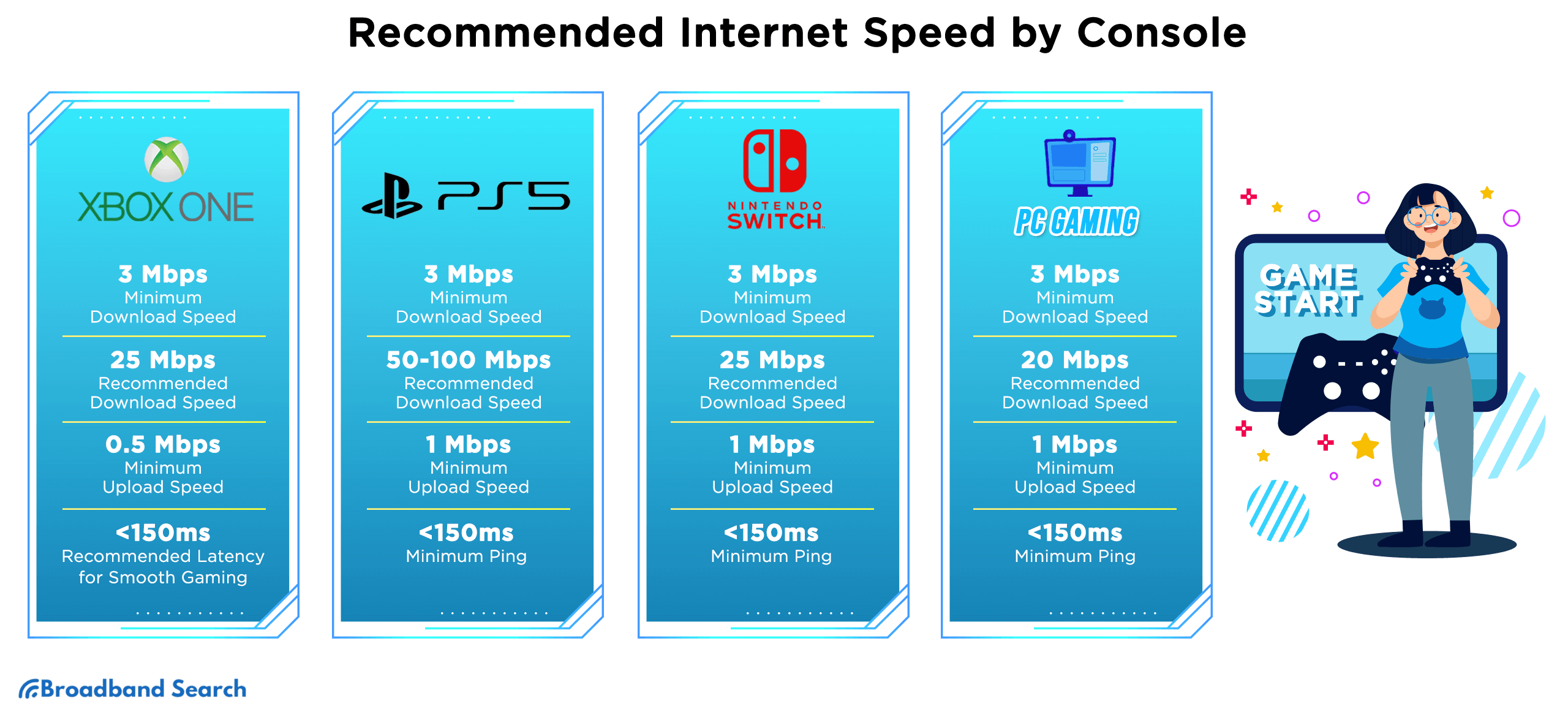
)
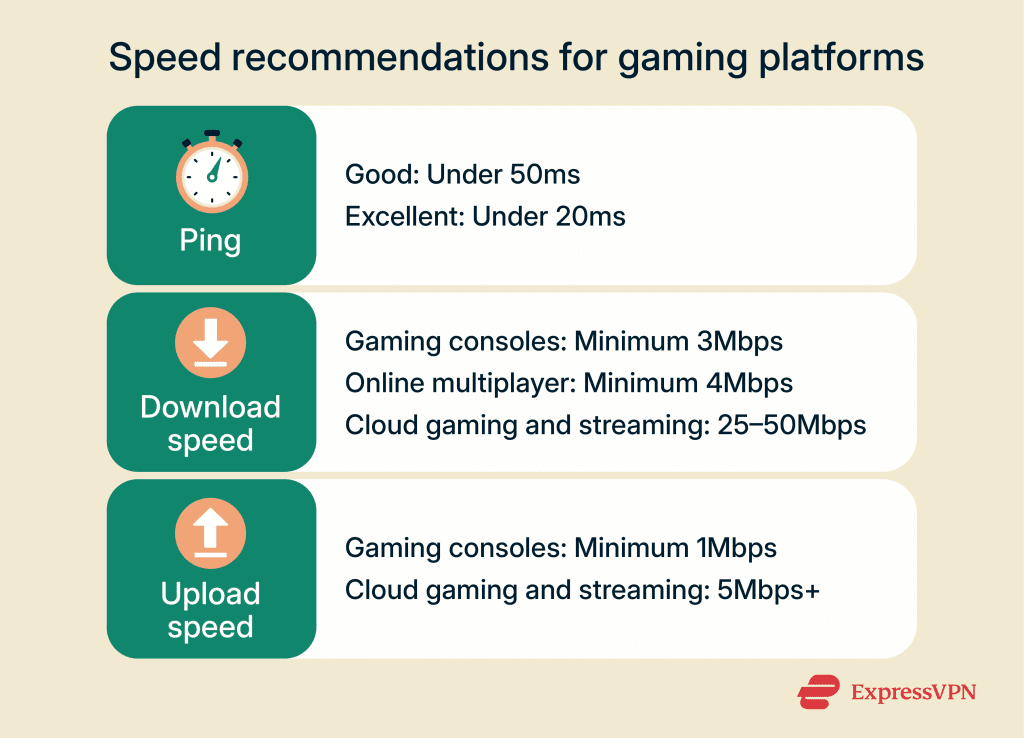
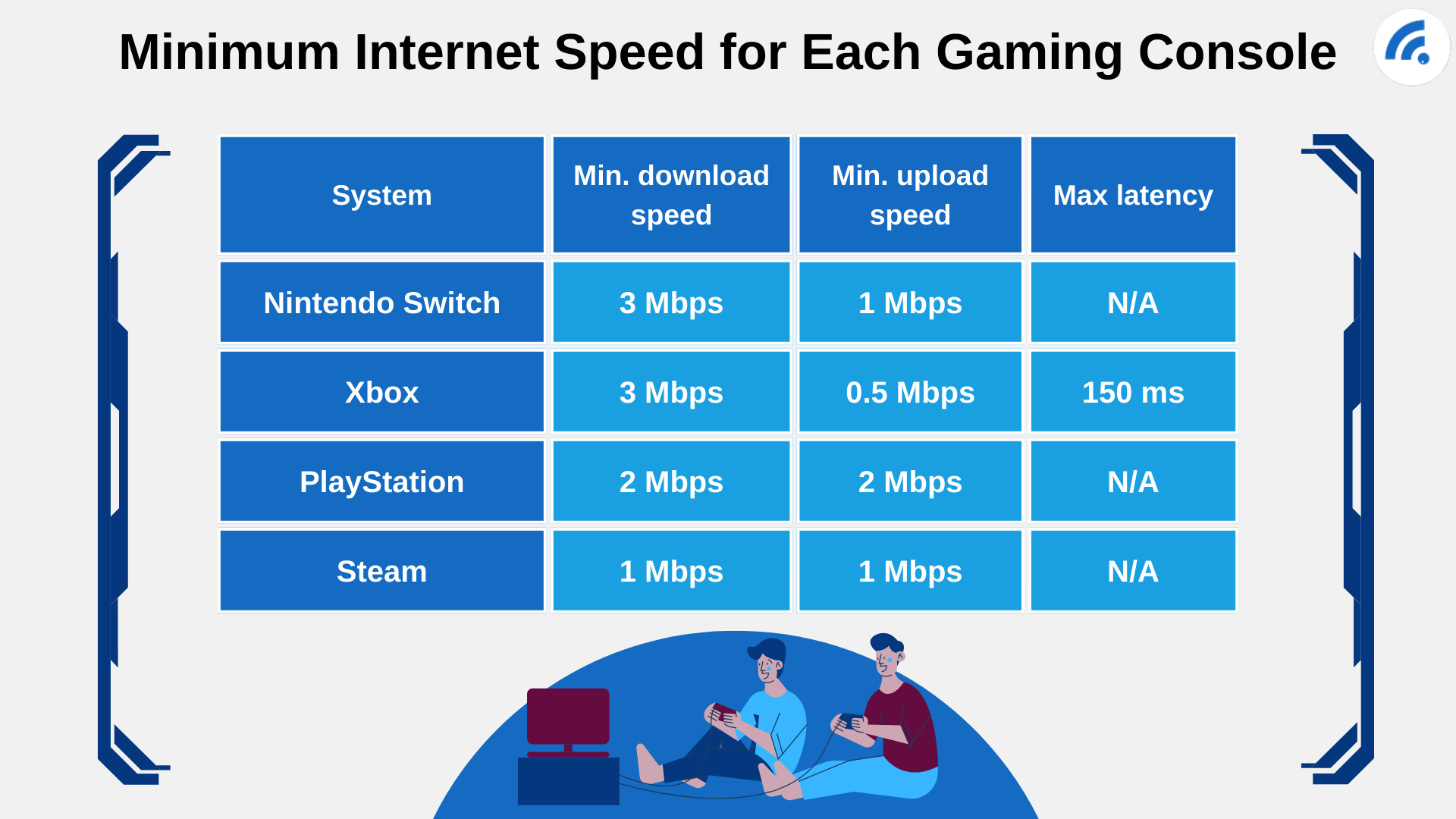

Gaming Test Speed Realme P1 Speed Vs Realme Narzo 70 Turbo PUBG Mobile G1 . What Is Ultrafast Broadband Speeds Benefits And How It Works In 2026 Filters Quality(75). Internet Speed For Gaming How Fast Do You Really Need Internet Speed For Gaming 2 1024x738 . Broadband For Gaming At Horace Gant Blog 2. Minimum Internet Speed For Each Gaming Console . What Games Use The Most Bandwidth 1 768x616


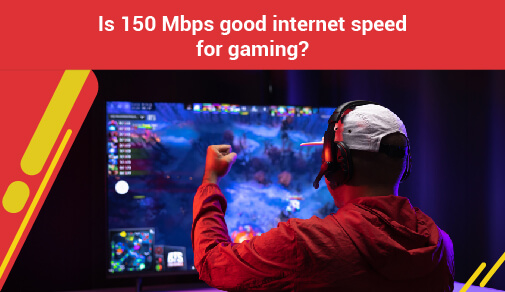
Ping In Gaming Good Vs Bad Latency E5d5d299 0e40 4702 8390 . Ping In Gaming Good Vs Bad Latency B2281c28 1642 469b Bcd5 . Is 40 Mbps Good For Gaming Lets Chat Is 150 Mbps Good Internet Speed For Gaming Blog Image . Is 30 Mbps Good For Gaming RouterCtrl Is 30 Mbps Good For Gaming . Tech Reviews Guides How To Latest Trends Is 1000 Mbps Good For Gaming 768x432

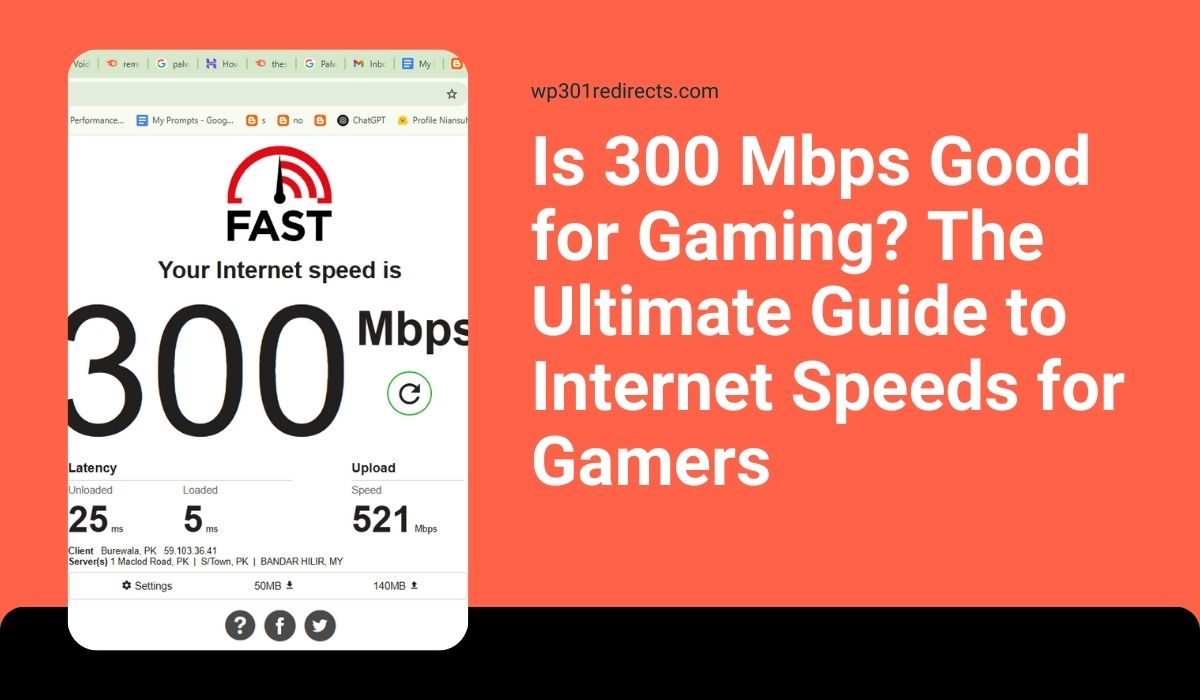

A Guide To Internet Speeds G5 Recommended Speed . Is 25 Mbps Good For Gaming GamingProfy Is 25 Mbps Good For Gaming . Is 25 Mbps Good For Gaming Things Avid Gamers Should Know Is 25 Mbps Good For Gaming 1024x683 . Is 300 Mbps Good For Gaming What You Need To Know Is 300 Mbps Good For Gaming . Megabits To Megabytes MB To Mb Mbps To MBps Conversions And Meaning MBps To Mbps To GBps Conversion 1024x1024


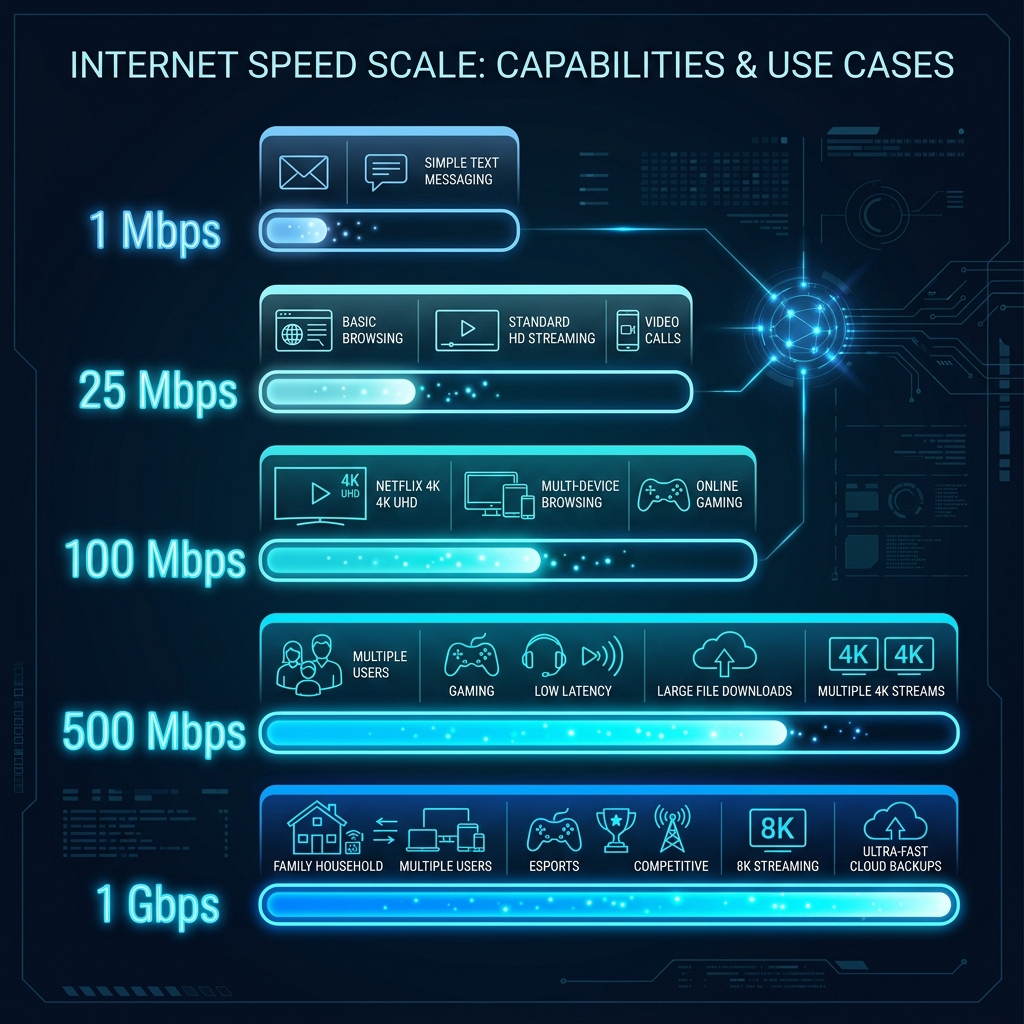
How Many Mbps Is Starlink Mini Dibujos Cute Para Imprimir Speed Chart . Gaming Archives W7cloud Is 200 Mbps Good For Gaming . How Much Mbps Do You Really Need Today How Much Mbps Do You Really Need 3 768x432 . Is Mbps Good Internet Speed Metrics In 2026 DCS Mbps Good Speed Scale . 200 Mbps Is Fast Enough For Gaming And Streaming And Here S Why PC Guide Is 100 Mbps Fast


Is 200 MBPS Good For Gaming Let S Find Out Is 200 MBPS Good For Gaming.webp. Ping In Gaming Good Vs Bad Latency F5526c59 D0b3 42bc 996e . How Many Mbps Is Fiber Optic At Bruce Green Blog Mbps 101 Table V4 . How Much 5G Speed Is Needed For Streaming And Gaming 1. How Much 5G Speed In Mbps Do You Need For Streaming And Gaming .webp. Is 300 Mbps Good For Gaming And How Fast Is 300 Mbps IS 300 MBPS GOOD FOR GAMING 1024x576



Top 5 Newest Wi Fi 7 Gaming Router In 2026 Reviews Buying Guide . Is 500 Mbps Good For Gaming Know More Details Is 500 Mbps Good For Gaming . What Is A Good Internet Speed How Much Mbps Speed Is Good Pngtowebp 05 041026 05 00 27 6485.webp. What Is A Good Internet Speed For Gaming Streaming Fatbeam Blog Inline3 . Best Internet Speed For Gaming 2026 Mbps Gaming PC Guru Best Mbps For Gaming Featured


How Much Mbps Needed For Poe Camera In 2026 Ultimate Guide How Much Mpbs Needed For Poe Camera 0.webp. Is 500 Mbps Good For Gaming GamingProfy Is 500 Mbps Good For Gaming 1600x893 . Is 10 Mbps Good For Gaming RouterCtrl Is 10 Mbps Good For Gaming . How Much Mbps Do You Really Need Today How Much Mbps Do You Really Need 2 1024x576 . Is 50 Mbps Good For Gaming Our Ultimate Guide Tells All Is 50 Mbps Good For Gaming 1 768x432